This is the latest installment in our quarterly feature highlighting the latest developments in AI that valuators need to know about, including useful advice on how you can begin — or continue — to introduce ground-breaking tools into your valuation practice.
The NACVA 2026 Business Valuation and Financial Litigation Super Conference in Salt Lake City featured several presentations that examined the growing role of AI in valuation. One such presentation dug into how agents can take valuation professionals’ AI use to another level.
Colin Brown, founder and chief technology officer of Syncnet, which helps consultants leverage AI and software, drew a large crowd to the main ballroom with the topic “Build Your AI Team: Agents and Workflows that Scale Your Practice.” He explained how AI agents can move valuators beyond using chatbots for simple tasks — like drafting emails and summarizing documents — and transform their practices in the process. Here are some highlights.
Note: The suggestions below assume you’ve set the privacy settings appropriately on your preferred AI tool.
Chatbots vs. AI Agents
At this point, Brown noted, most valuators are using chatbots like Claude and ChatGPT. “The problem is so many of them are still kind of stuck in chat mode, where they load financials and ask a question about them — as opposed to telling an agent to create an Excel spreadsheet from them. Valuators can use it for so much more than they are.”
What’s the difference between chatbots and AI agents? Chatbots respond to one question (or prompt) at a time. Brown says they’re useful for quick answers and brainstorming. But they can respond to only a single prompt at a time; the user much orchestrate every additional step. Traditional chatbots don’t retain a persistent memory of multi-step work and can’t independently open files. In a nutshell, when you engage with a chatbot, you’re essentially engaging in a reactive Q&A.
By contrast, Brown describes AI agents (for example, Cowork in Claude and ChatGPT Work) as “goal-directed workers” that can break goals into steps and execute them. An agent will remember the context across an entire work session. It can read documents, extract data, and run calculations, calling in tools (for example, search, databases, or code) where needed.
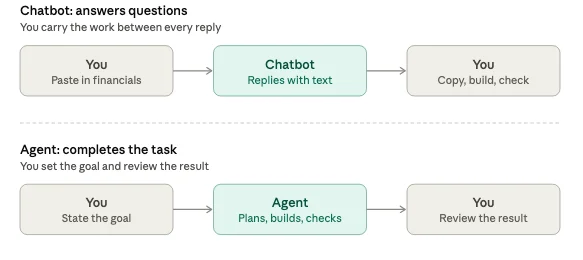
“You don’t necessarily ask an agent questions,” Brown says. “You can give it a task like ‘create a DCF model with this forecast information, with a CVA slant to it.’ It will spawn off multiple agents that you didn’t tell it to spawn off — it just knows that it needs to do so to complete the task.”
This type of agent autonomy may make you nervous, but you can set guardrails. You might, for example, instruct an agent “don’t email my client without permission.”
Keep in mind, too, the importance of maintaining a “human in the loop.” You must inspect your agent’s intermediate results, correct course where necessary, and, of course, apply your professional judgment and expertise to reach conclusions you can stand by.

“Agents accelerate preparation and analysis,” Brown says. “The professional still owns the opinion, the methodology choices, and any testimony. Agents don’t replace professional judgment — they free capacity for it.”
Technical Abilities Not Required
The potential to improve efficiency with AI agents is vast, but valuators who aren’t particularly technical (after all, technology isn’t their core competency) may be daunted by the prospect of trying to develop their own agents. They needn’t be, according to Brown. “The AI companies realize that not everyone is technical, so they’ve tried to make agents that people don’t know are agents.”
Claude, for example, is in the process of introducing a new way to use both Cowork and chat that removes the distinction between the two products. For some time, it has required users to choose the Chat or the Cowork mode:

Now it’s merging the two tools into a single conversation (the company is rolling out this feature gradually, so don’t be alarmed if you still see both modes). Just tell Claude what you want, and it will determine the appropriate tool. Brown expects that the other leading AI companies will soon follow suit.
Specializing Your Agents with Skills
One of the advantages of AI agents have over basic chatbots is the ability to leverage “skills.” These are reusable resources that can convert a general-purpose agent into a specialist. Typically, once you’ve created a skill in your environment, the agent will automatically apply that skill whenever it’s relevant to your request. You don’t need to do anything to activate it.
“In the past, Chat had custom GPTs, which were basically a prompt you can store and save for multiple uses, but they’re getting rid of that. All of the major AI companies are moving to skills. And what’s cool is that skills are transferable — you can use the same skills in Claude, Chat, Grok, etc.”
As an example of how skills work, Brown cited an email he received from a valuation analyst who wanted to convert the data in a schedule of assets and debts used in a family court into an Excel model. “I entered the email message into Claude as the instructions, along with the spreadsheet for the model and the schedule, and the agent performed the function. Then I said ‘turn this into a skill’ so we can do it over and over.”
Again, no coding or technical ability is required to add new skills to perform workflows you use routinely. You can perform a function and then instruct the agent to create the skill, as Brown did. Alternatively, you can start from scratch. On Claude, for example, you can select “Customize” from the lefthand menu, and push the “Add” button:

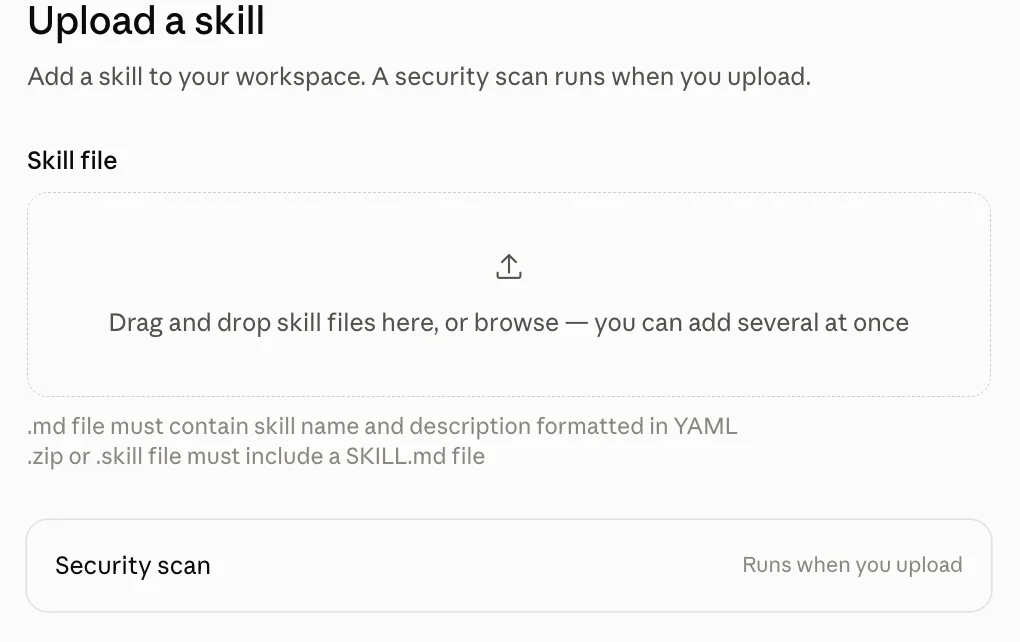
You’ll get a dropdown menu with three options. You can upload an existing skill:
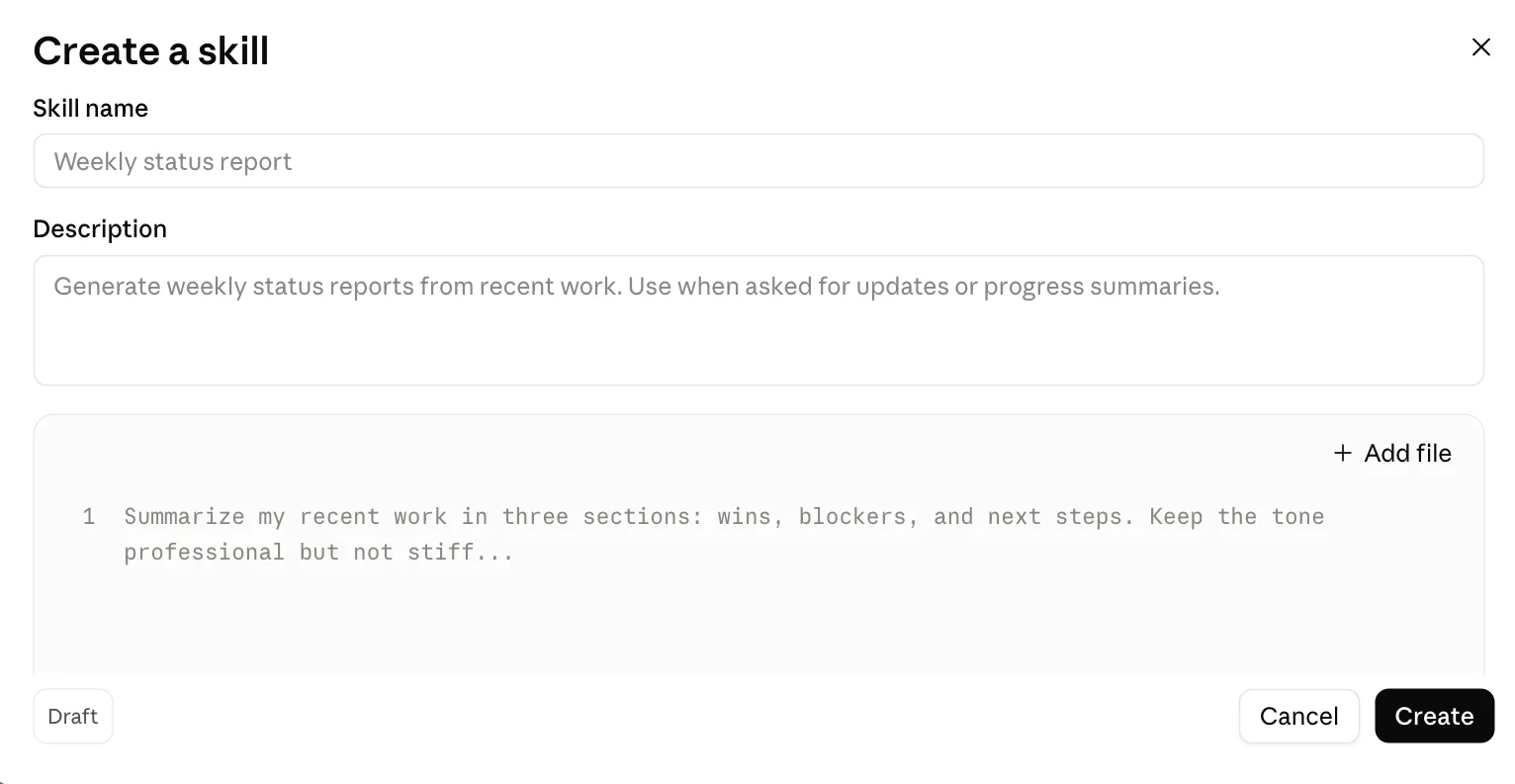
You can create a skill:
Or you can create a skill with Claude’s assistance:

Don’t use Claude? You can go to your preferred AI tool — ChatGPT, Grok, Copilot, Gemini, or otherwise — and ask it how to create skills.
Valuation Use Cases for AI Agents
In his presentation, Brown pointed to several “high-leverage” agent applications for valuators, including:
Financial statement extraction. Convert multi-year PDFs, Excel workbooks, and tax returns into structured tables ready for normalization.
Comparable company screening. Screen public and private comps by industry, size, and geography. Pull key multiples, and normalize for differences.
Guideline transaction research. Aggregate deal data, extract disclosed multiples, and flag relevant transactions with supporting notes.
First Steps
Brown advises valuation professionals who see the potential gains from using AI agents to start small. “Instead of trying solve all of your workflow problems today, let’s just solve one,” he says.
Brown’s presentation included a five-step process for building an agent for one task:
1) Define task: Pick a repeatable, preferably high-volume task (for example, balance sheet analysis or industry research).
2) Connect the data: Link source files, systems, databases, etc.
3) Build logic: Write the steps in plain language. For example, “Extract all line items from this trial balance PDF, map them to our standard chart of accounts, and flag any account with no
prior-year match.”
4) Add checks: Validate outputs (for example, checking that the right numbers are in the right column of an Excel worksheet).
5) Test and refine: Run it, fix it, and run it again.
“This process works for any task,” Brown says. “Only the details change.”

